
How to Build a Free Website With AI in 2026 (No Code, 6-Step Guide)
 By Chun Lee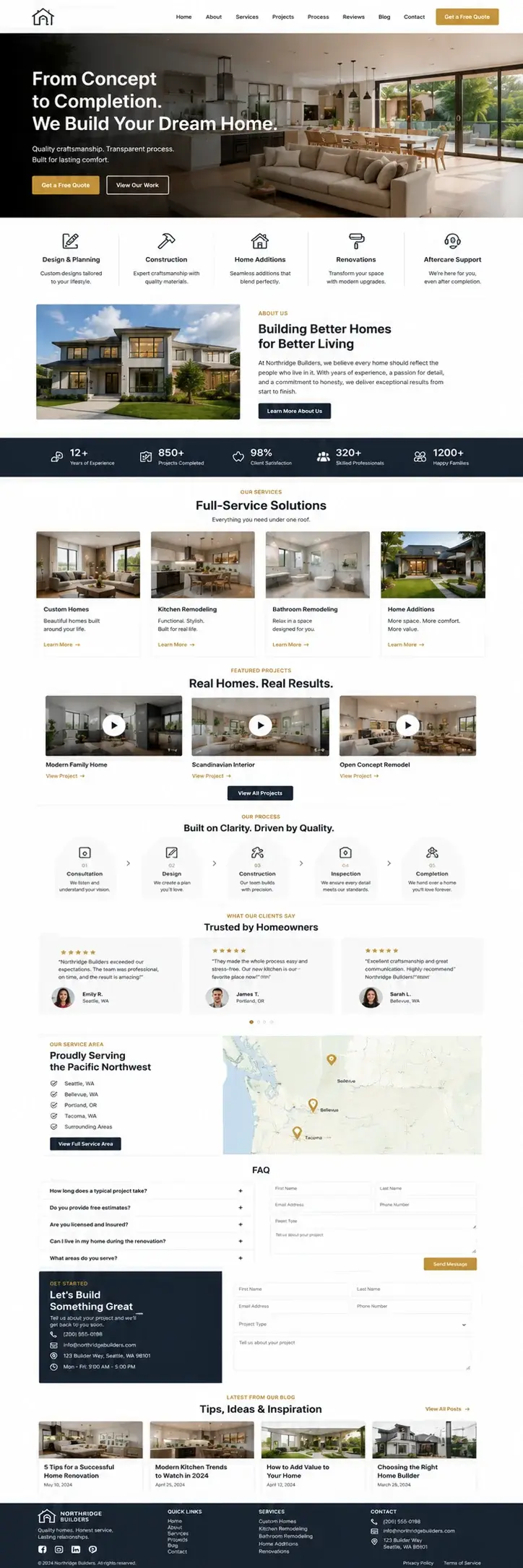
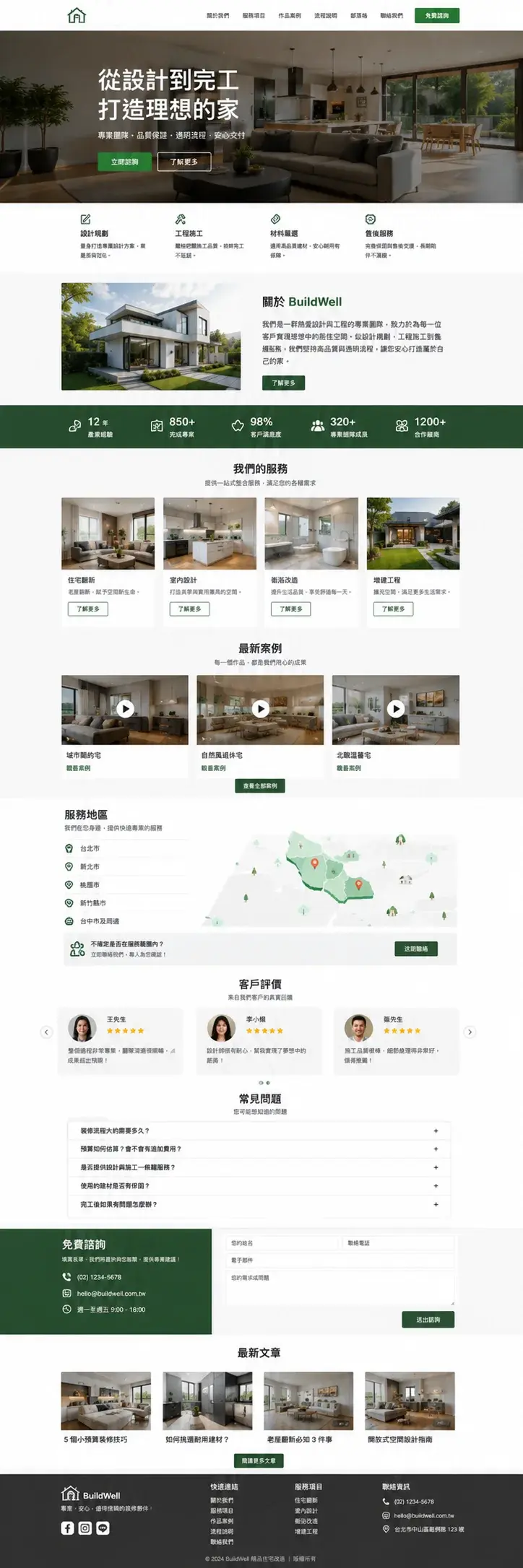
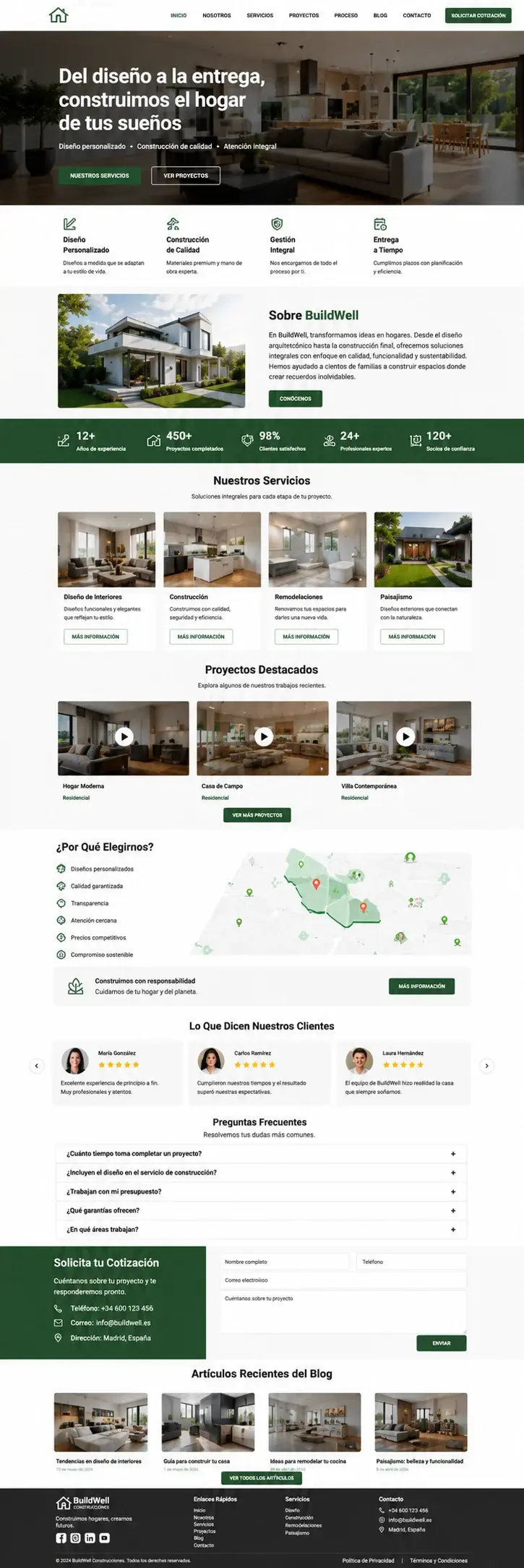
Three real construction company sites built with this exact workflow - same 6 steps, three languages (English, Traditional Chinese, Spanish). Hover to preview the full page, click to enlarge.
In 2026, small business owners can build a free, professional website in under one day using AI - no coding, no design skills required. Follow along and ship a site that does not smell like AI slop. The barrier was never technical; it was the cost of designers, developers, and time. AI removed all three. This guide outlines one of the workflows recently used and validated by the NTD Digital web design and development team across industries including construction, legal, dental, restaurants, real estate, and more.
Three years ago, a decent business website ran thousands of dollars and several months. Today, a non-coder following this process can ship one in a few hours of focused work. The catch is that “shipping a website” and “shipping a website that earns” are still two different things - if your business depends on the site generating leads, you may want a professional website design team handling it from day one. Either way, this guide tells you what good looks like.
Can a non-coder really build a professional website?
Yes. In 2026, AI tools are mature enough that someone with zero coding experience can follow a 6-step process and ship a live HTML website in one day. The skill is not writing code - it is giving AI the right instructions. Knowing what your audience wants, choosing the right design, and reviewing AI output critically: that is what matters. AI executes. You decide.
What tools do I need to get started?
Just four things:
- A computer (Mac or Windows, either works)
- Claude or Codex - an AI tool that reads images and writes code
- A copywriting AI (regular Claude or ChatGPT works; an AI trained on your company’s data works better)
- A place to save the HTML file (your desktop is fine to start)
No dev tools to install. No complicated signups.
What is the first step? Should I just open Claude?
Do not open Claude yet. Step one is studying what websites in your industry look like.
This step matters most, and 90% of people skip it. Industry conventions vary enormously - law firms are formal and stacked with badges; restaurants lean on food photography; construction companies showcase past projects and licenses; dental practices emphasize trust signals and appointment booking; designer portfolios emphasize white space.
The overall design complexity also varies a lot by industry. Construction firms tend to keep things utilitarian - hero, services, gallery, phone - because their buyers want trust signals fast, not visual fireworks. Influencer and creative agencies do the opposite, leaning into custom typography, scroll-driven motion, and oversized type, because creative output is the product on display. Restaurants often skip contact forms entirely; a menu, hours, and a Resy or OpenTable button is usually enough. Study what already works in your industry before you start designing your own - it saves hours of rework later.
Your website needs to serve your business goal. Do not copy someone else’s site at random.
How to do it:
- Google the keywords closest to your business - “construction company Atlanta,” “personal injury lawyer Dallas,” “Italian restaurant Chicago”
- Open the top 3-5 results
- Pay attention to: what is the first thing on the homepage, how many sections each site has, and whether the overall feel is dynamic or steady
Should I write copy first or design first?
Write copy first. Design second. The shell of a website goes up fast. The real time sink is the content. Lock in your copy before touching design, or you will rework layouts every time you tweak a word.
The copy process has three parts: build a subject profile, run competitive analysis, then write and curate.
For the subject profile, feed the AI your business basics - name, address, services, reviews, awards, who you serve. The AI organizes this into a profile you will reuse throughout. For competitive analysis, drop those 3-5 sites into the AI and ask what they emphasize, how their headlines read, what their CTAs say, and how you can be different.
Then write copy. Ask for 3-5 versions of each piece, pick the one that lands hardest for your audience, or combine the strongest parts. Do not ship the AI’s first draft. Final copy is always a human decision.
How do I make sure the AI’s output looks consistent?
Tell Claude to use a fixed design system. A design system is a pre-made set of visual rules - fonts, colors, buttons, spacing - already decided by someone smart. Think IKEA vs. West Elm: both have a distinct aesthetic, and once you pick one, everything that follows looks like it belongs together.
The main options:
| Design System | Style | Best for |
|---|---|---|
| Carbon Design System (IBM) | Formal, serious | B2B, enterprise, construction, legal |
| Material Design (Google) | Rounded, modern | Apps, consumer brands, restaurants |
| Apple HIG (Apple) | Clean, premium | Design-forward, high-end brands, hotels |
Pick one, then tell the AI: “Please import Carbon Design System for this project and follow its rules throughout.” Every line of code from there on will follow those rules. You do not need to know the details.
What sections does a website need, top to bottom?
It depends on your industry, but there is a pattern for each one.
A construction company usually runs: hero + “Get a Free Quote” → services → about + credentials → project gallery → testimonials → FAQ → contact form → footer. A law firm runs: hero + “Free Consultation” → practice areas → attorney bios → case results → reviews → FAQ → intake form → footer. A restaurant or hotel runs: hero + “Reserve a Table” → menu highlights → location and hours → photo gallery → reviews → events → contact → footer. A dental or medical practice runs: hero + “Book an Appointment” → services → about the doctor → before/after gallery → patient reviews → insurance accepted → contact → footer.
Not sure how to lay it out? Browse Awwwards, Land-book, Mobbin, and Dribbble. Screenshot anything you like. A typical site needs 3-5 reference images: one hero, one main content area, one social proof, one contact section.
How do I turn screenshots into a real website?
Drag the screenshots into Claude with specific instructions. Drop one in at a time and say something like: “Build a hero section based on this image. Headline: From Design to Move-In. Subheading: Trusted residential builders with 10+ years of craftsmanship. Button 1: Get a Free Quote (links to #contact). Button 2: See Our Work (links to /gallery). I’ll provide the background image separately.”
Claude gives you HTML + CSS code. You do not need to read it - just keep telling the AI to build the next section. Hero, then services, then testimonials, until you reach the footer. After each section, double-click index.html to preview in your browser. If something feels off, tell the AI to fix it, and keep reminding the AI to follow the design system you imported.
What do I do after the design is in place?
Read the whole site as a visitor would, sentence by sentence. By now the skeleton is built but the text is probably still Claude’s placeholder copy. Open the doc with your real copy from step two and replace it section by section. You can also ask Claude to do the swap: “Replace all placeholder copy on this page with the following: [paste your copy].”
Then audit through the visitor’s eyes. Does the headline hit what your reader actually cares about? Is the CTA crystal clear? Is there a hook that pulls them deeper? Does the tone match your brand? Fix what is off. A few rounds will not take long.
Where do I host the website for free?
For most small business sites in 2026, hosting is free. Once you have your index.html file, here are the best free options:
| Service | Best for | Free for business? | Why |
|---|---|---|---|
| Cloudflare Pages | Best overall free choice | ✅ Yes, no restrictions | Fastest global CDN, free custom domain, free SSL, unlimited bandwidth. Connect a GitHub repo and every change auto-deploys. |
| Netlify | Absolute beginners | ✅ Yes (100 GB/month bandwidth cap) | Pure drag-and-drop - drop your HTML folder into the browser, get a live URL in 30 seconds. Built-in contact form handling (no backend code). |
| GitHub Pages | If you already use GitHub | ⚠️ Marketing sites OK; e-commerce and SaaS are banned in their ToS | Free hosting at yourname.github.io. Slower CDN than Cloudflare, custom domain takes a few extra DNS steps. |
| Vercel | If you will add complexity later | ❌ Hobby plan is personal use only - Pro ($20/month) required for any commercial site | Same speed as Cloudflare, slightly more dev-oriented. Free tier is generous but personal-only. |
For a business site, stick with Cloudflare Pages or Netlify - both allow commercial use on their free tier with no asterisks. Start with Netlify if you have never touched GitHub - literally drag, drop, done. Move to Cloudflare Pages for a custom domain long-term. Skip Vercel unless you are willing to pay from day one; their Hobby tier explicitly excludes commercial use, which is a detail many people miss until they get an email.
How long does it take to build a website with AI?
A first-time builder can ship in about a day of focused work.
| Step | Time |
|---|---|
| Studying competitor sites | 0.5 hour |
| Writing copy (the longest step) | 1 hour |
| Choosing a design system | 0.5 hour |
| Planning the layout | 0.5 hour |
| Building it with AI | 2 hours |
| Swapping copy + review | 1-2 hours |
| Deploying to Cloudflare Pages or Netlify | 0.5 hour |
What can AI do, and where do you still need a professional team?
AI can build a website that runs. Turning it into a website that earns is a different job. Three years ago, a corporate website ran thousands of dollars over several months. Today, a non-coder with AI can produce an 80-point version in a few hours. The gap between “an 80-point website” and “a website that drives revenue” is where we work at NTD Digital, across construction, law firms, dental practices, restaurants, and other industries:
- Design layer - AI layouts work, and importing a design system already adds serious polish. Getting to true enterprise quality takes an expert eye on brand consistency, mobile rendering, and cross-browser testing. This is the gap our website design service closes.
- Conversion layer - A pretty website is not a website that earns. We run conversion analysis to find where visitors drop off and lift conversion rate before adding traffic.
- Launch and hosting - Cloudflare Pages gets you online for free, but domain configuration, email setup, form integrations, CRM connections, customer service tools, and SEO setup are all manual.
- Long-term maintenance - Going live is the starting line. Monthly analytics, content updates, GEO content refreshes, and turning traffic into qualified inquiries is ongoing work, not a one-time project.
In one sentence: AI helps you build a website that runs. NTD Digital helps you turn it into a website that earns.
FAQ
Can I embed the AI-built HTML into my existing website?
Mostly yes. Every major site builder accepts custom HTML - WordPress (Custom HTML block), Wix (HTML iframe widget), Squarespace (Code Block), Shopify (Custom Liquid section), Webflow (Embed component), HubSpot CMS (Custom HTML module), Ghost (HTML card), and even Weebly or GoDaddy Website Builder all support raw HTML embeds. Drop your AI-generated section into one of these blocks and it renders. The catch: the embedded section will look out of place if its typography, colors, and spacing do not match your existing site - expect to spend time tweaking the CSS until both feel like one cohesive design.
Will Google rank an AI-built website?
Yes. Google ranks based on content quality, site speed, mobile usability, and backlinks - not whether a human or AI wrote the code. AI-generated HTML often loads faster than bloated template builders because it skips the extra framework code. The bigger ranking question is content quality and topical authority, which is where most AI-built sites fall short without proper SEO and GEO work.
Can I use this workflow for an ecommerce store?
Partially. The 6-step process works for the marketing pages (landing, about, product detail). For the actual shopping cart, payment, and inventory, you need Shopify, WooCommerce, or similar. A common pattern is to use AI to build a brand-forward marketing site and embed Shopify checkout for the commerce layer - this is one of the ecommerce setups we run for DTC clients.
What if I make a mistake in the AI’s code?
If a section breaks, screenshot it, paste it back into Claude, and ask the AI to fix the specific issue. Most fixes take one or two prompts. Worst case, delete the broken section and ask Claude to rebuild it. Version-control your index.html by saving a copy before major changes.
Work With NTD Digital
NTD Digital works with small and mid-sized businesses across the United States - construction companies, law firms, dental practices, restaurants, hotels, real estate agencies, and more. Our website design service takes a site from concept through launch, hosting, and the conversion optimization that turns visitors into qualified leads. If you want to skip the DIY route or hand off the heavier engineering work, contact us from your business email. We will reply within 24 hours and include a sample Website Conversion Audit for your industry.