
Social Media SEO in 2026: How to Rank Your Instagram, YouTube, and TikTok Content on Google
 By Chun Lee Updated August 10, 2026
Google Search Console now lets you measure your social and video posts the same way you measure your website. The feature is called platform properties, and since July 29, 2026 it is available worldwide - every account, no waitlist, no staged access. Connect your Instagram, TikTok, X, or YouTube account and you can finally see which search terms lead people to that content (Google Search Central). Google shipped a companion guide to analyzing the data at the same time.
If you needed proof that social and video content is now core to how people find businesses in search, this is it. So let’s get practical: what the feature means, how to switch it on, whether it changes your website strategy, and exactly how to optimize your Instagram and YouTube content to get found.
What are Search Console platform properties?
Platform properties are a Search Console property type, announced by Google on July 7, 2026 and available worldwide since July 29, 2026, that lets creators and brands measure how their Instagram, TikTok, X, and YouTube posts perform in Google Search, Discover, and Google News.
Until now, Search Console was almost entirely about websites - you verified a domain you owned and measured how your pages ranked. Platform properties change that. Instead of a website, you connect a social or video account, and the Performance report gives you total clicks, impressions, average CTR, and average position for that account, filterable down to which individual posts drive the most traffic (Search Console Help). It is a first-party read on how your social content actually performs in Google. Each platform is its own property, so its data stays separate from your website’s.
This did not come out of nowhere. Google first introduced social channels in Search Console back in December 2025; platform properties are that idea finished and shipped.
How to add your social accounts to Search Console
Open the property selector, choose “Add property,” and pick your platform from the “New” section on the “Select a property type” screen.
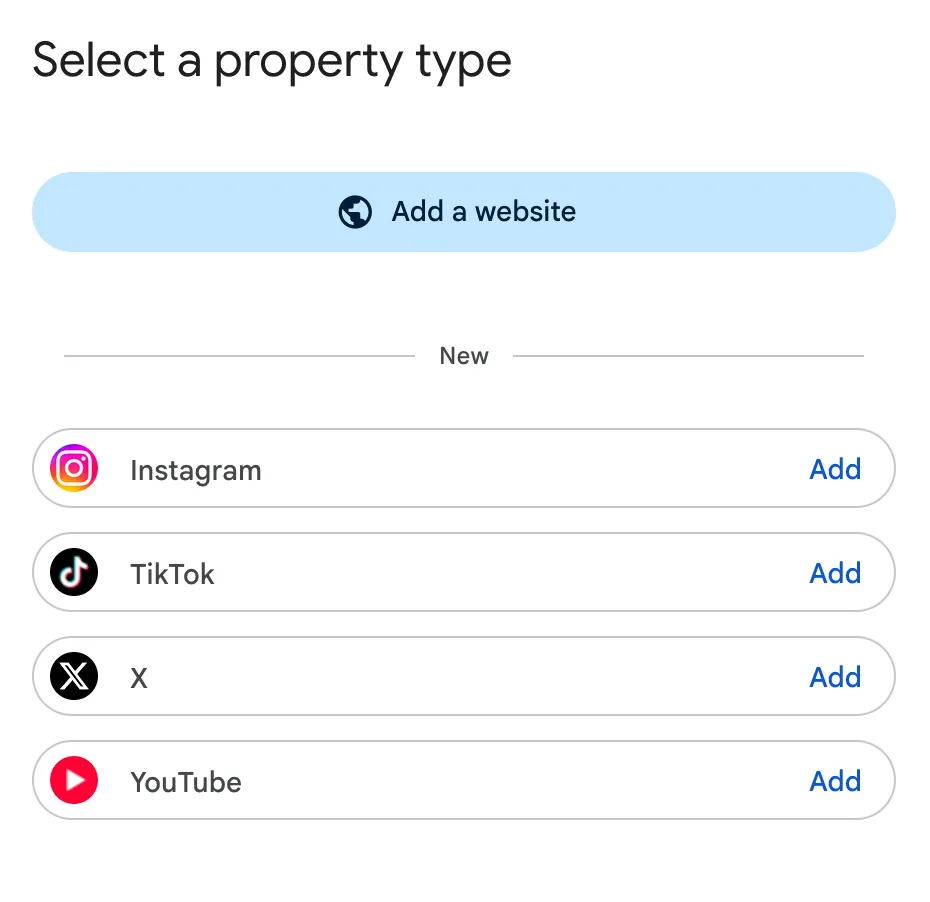
The screen now has two halves. “Add a website” is the classic flow you already know. Below it, under New, sit Instagram, TikTok, X, and YouTube, each with its own Add button. Click the one you want, then follow the prompts to connect and verify that account (Search Console Help).
A few things worth knowing before you start:
- Connect every platform you actually post on. Each becomes a separate property with its own reporting, so there is no downside to adding all four.
- You need to own the account. Verification runs through the platform itself, so you must be able to log in as that account - not just manage it through a scheduling tool.
- Data starts accumulating from connection. Add the properties now even if you are not ready to analyze them, so you have history to look back on later.
Is SEO dead now that social content ranks?
No - SEO is very much alive. Organic search still drives roughly half of all website traffic, and even AI results mostly cite pages that already rank well.
What has changed is that social and video content now competes alongside websites in search results. But websites are not going anywhere. Google still refers far more traffic to sites than ChatGPT and Gemini combined, and AI Overviews overwhelmingly cite pages that already rank - one study found they cut clicks to top-ranking pages by 58% (Ahrefs, 2026), which only raises the stakes on being the source that gets cited. Your website stays your trust anchor and the place bottom-of-funnel buyers convert. The winning move is not to choose - it is to run the same keyword strategy across your website and your social content.
Instagram SEO: how to get your posts found
Instagram SEO is the practice of optimizing your profile, captions, and media so Instagram’s search surfaces your posts to the people searching for what you offer - not just your existing followers.
Instagram’s algorithm reads and categorizes your content with AI, so give it clear signals:
- Keywords in your name and bio. The Name field and bio are heavily scanned. Work your primary keyword in - “Santa Clara Coffee Roaster | Jane” tells search far more than just “Jane.”
- Captions like mini blog posts. Write naturally, but include the exact phrases your audience searches for. A descriptive caption gives the algorithm more context than a lone row of hashtags.
- Say and show your keyword. Instagram “watches” Reels - state your main keyword out loud in the first few seconds and add clear on-screen text.
- Add alt text. Under Advanced Settings, write descriptive alt text that includes your keyword, so both accessibility tools and search understand the image.
- Use 3-5 precise hashtags. Skip broad, spammy tags. A few highly relevant, niche hashtags categorize your post far more accurately.
- Geotag for local reach. If you serve a specific area, add a location tag so you appear when nearby users search for your service.
YouTube SEO: how to rank your videos
YouTube SEO is the process of optimizing your titles, descriptions, tags, and captions - plus watch time and engagement - so your videos rank higher in YouTube search, suggested videos, and Google results.
YouTube is effectively the world’s second-largest search engine, and its videos also appear in Google - so strong optimization earns you double exposure. Because the algorithm cannot watch a video the way a person does, it leans heavily on text and on how viewers respond:
- Start with keyword research. Use YouTube’s autocomplete, study the titles and tags of top-ranking videos in your niche, and check monthly search volume with a keyword tool before you film.
- Title. Put your primary keyword near the front, keep it around 60 characters, and make it worth the click.
- Description. Open with a 2-3 sentence summary that uses your main keyword and a few related terms.
- Tags and captions. Add 5-10 relevant tags, and upload or edit your captions - YouTube scans that text, so the keywords you actually say on camera count.
- Thumbnail and CTR. A bright, clear, high-contrast thumbnail paired with a compelling title wins the click.
- Watch time and engagement. Hook viewers in the first 5-10 seconds and keep the pacing tight. Retention, likes, comments, and shares are strong signals that push a video up.
- Watch the first 30 minutes. Traffic in the first half hour after publishing tells you a lot. If views are not picking up, swap the title and thumbnail quickly - early performance signals compound, and a stronger hook can rescue a video before the algorithm writes it off.
What about TikTok, X, and LinkedIn?
The same rules apply: lead with your keyword, write real text, and post natively - TikTok and LinkedIn both function as search engines their users rely on.
TikTok users increasingly search the app directly, so put your keyword in the caption and in on-screen text. On LinkedIn and X, the opening words of your post shape the page title, meta description, and URL slug - so lead with your target term to land it in all three. One caution: do not try to force-index every post through automated indexers. Username-pattern URLs make that footprint trivial for Google to spot and discount. Optimize the content, then let it earn its place.
How to actually read the data once it’s flowing
Google published a companion guide on July 29, 2026 covering three analyses worth running: understand your search audience, revive content that’s regaining traction, and compare formats.
Connecting the property is the easy part. Google’s guide to analyzing social and video content is written for creators, social media managers, and SEO professionals, and it points at three things most people would not think to look for:
- Understand your search audience. The Insights report surfaces the top query groups sending traffic from Google Search to your social and video content, plus which groups are trending up and trending down. Trending-down groups are the early warning; trending-up groups tell you what to make more of.
- Revive content that’s regaining traction. Search Console lets you spot older videos that are picking up search traffic again. An eighteen-month-old video climbing back up is usually a topic returning to demand - and it is far cheaper to refresh a title and description than to film something new.
- Test changes properly. Use Search Console annotations to mark the date you rewrite a YouTube title or a TikTok caption, then watch whether search performance actually moves. This turns “we rewrote some titles” into a measurable before-and-after.
- Compare formats. Apply page filters or comparison mode to weigh short-form against full-length video, or one playlist against another - so format decisions come from your own data instead of general advice.
What this means for your strategy
Treat social as a search channel, not just a brand channel. Keep targeting keywords with your website - that foundation is not going anywhere - and extend the same intent-driven approach to the Instagram, YouTube, TikTok, and X content you are already producing. Platform properties are live in every account today, so connect them now, watch which queries bring people to your posts, and double down on what works.
The brands that win the next phase of search will not choose between website SEO and social. They will run both, around the same keywords, and measure all of it.
Want help turning your social content into a search channel - and your website into a page-one asset? Talk to our SEO team or explore our SEO services.
Frequently Asked Questions
What are Google Search Console platform properties?
How do I add my Instagram or TikTok account to Search Console?
What is Instagram SEO?
What is YouTube SEO?
Is SEO dead now that social content ranks?
Which platforms does platform properties support?
Still have questions? Talk to our team →